
Flagship demonstrator
One workflow from instruction to invoice.
Field service & commercial workflows
Property operations platform
Working demonstrator with synthetic data. Client identity withheld.
The operational challenge
The work crosses departments. The records need to follow.
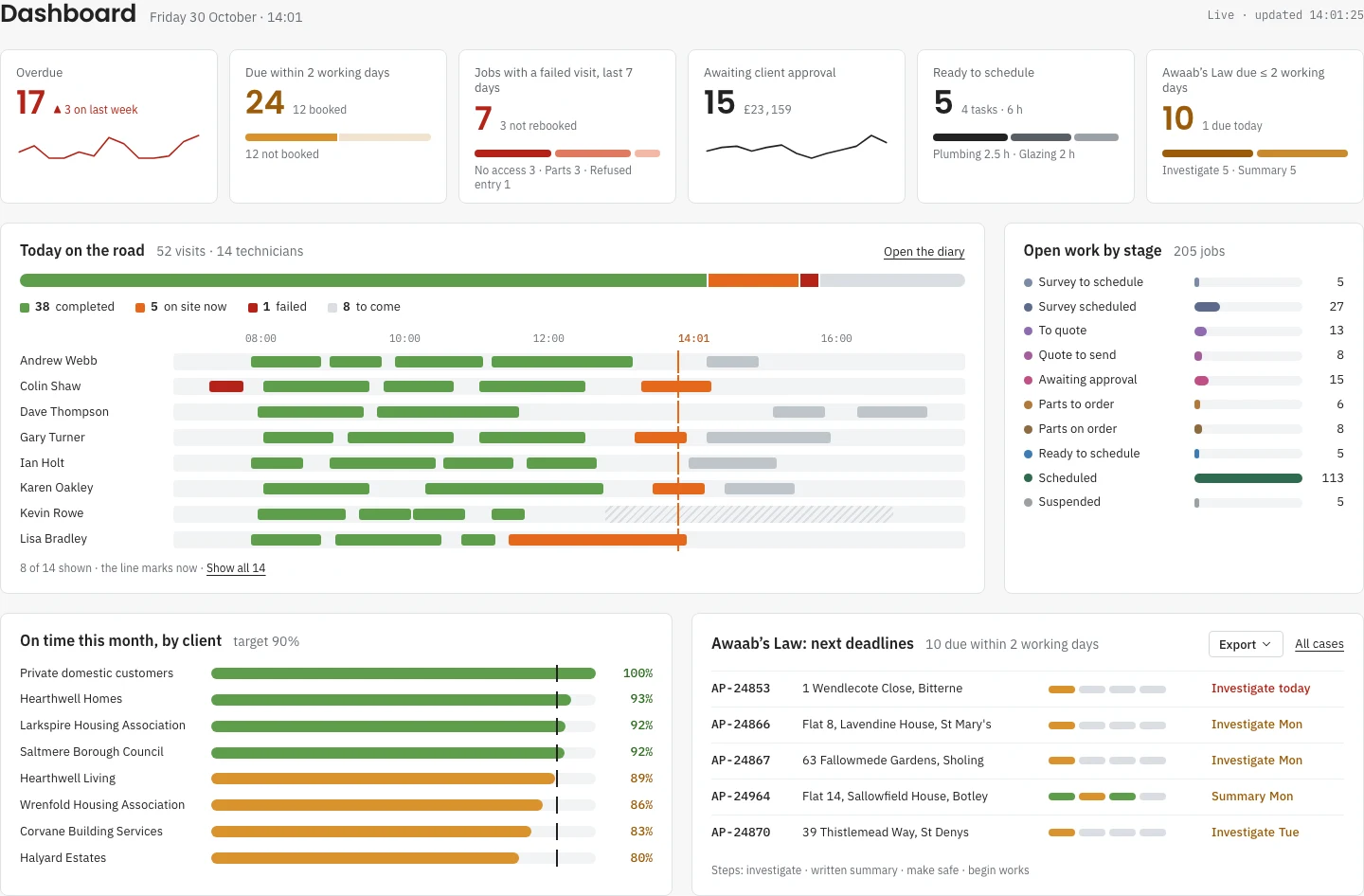
A property job can involve an instruction, a survey, several trades, repeat visits, a quotation, client approval, materials and staged invoices. A single status on a spreadsheet cannot explain everything still outstanding.
The demonstrator brings those hand-offs into one job record. Office staff can see what needs a decision, schedulers can see the work waiting to be booked, and field updates return to the same operational history.
Connected workflows
A connected workflow across the whole job.
- One operational job record
- Bring the instruction, property history, survey, tasks, visits, notes and commercial records together. Keep outstanding work visible when a job spans several trades or visits.
- Scheduling connected to field work
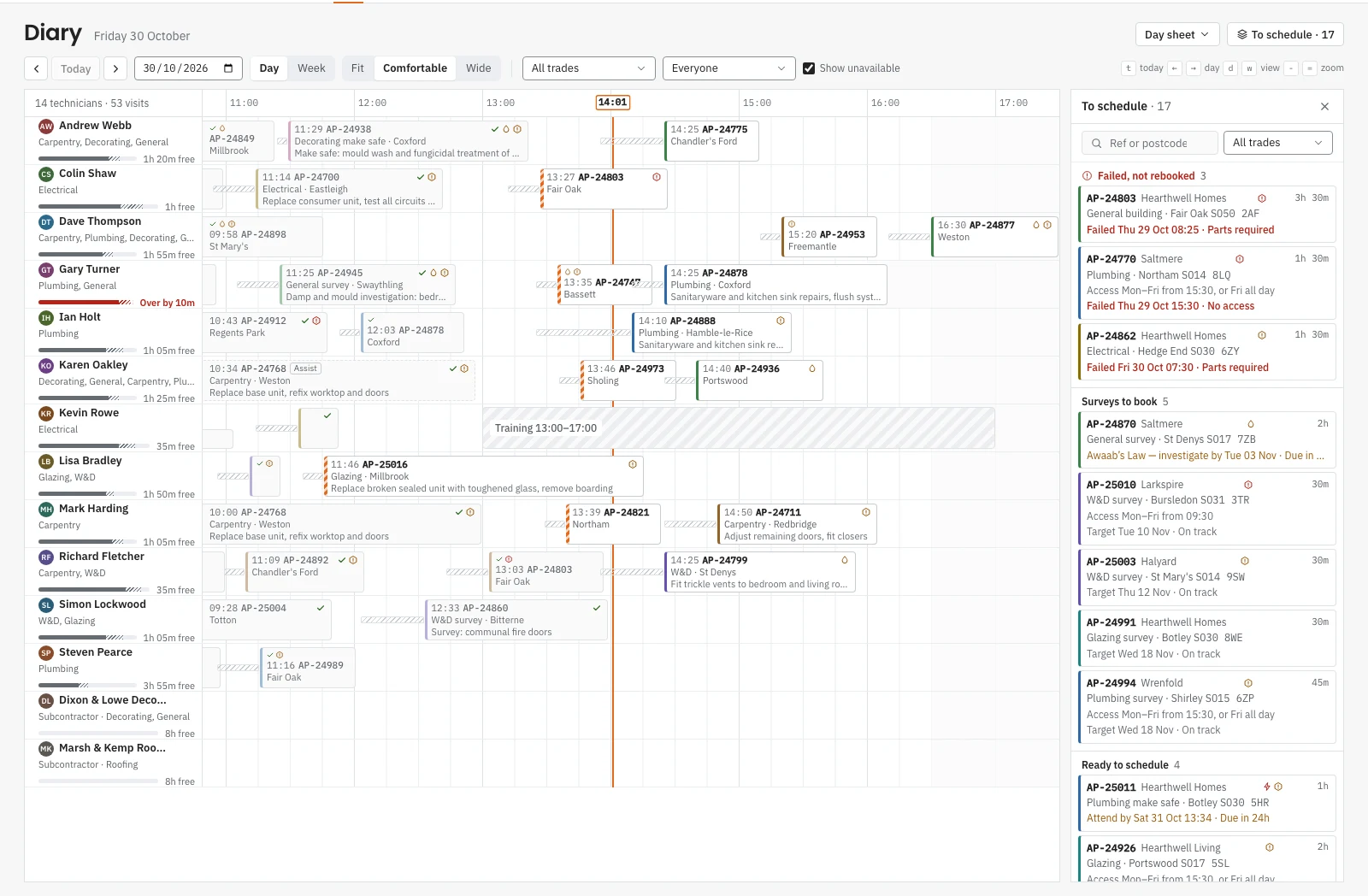
- Book work on a technician diary with trade, availability and work-status checks. Mobile visit outcomes feed back into the office workflow.
- Surveys, quotations and approvals
- Build quotations from survey evidence and versioned rate books. Record approval, revisions and exceptions before approved work becomes tasks to schedule.
- Purchasing, costs and invoicing
- Follow orders, supplier invoices, visit costs and staged billing through the job. Closure checks keep missing commercial records visible.
- Operational and commercial reporting
- Move from dashboard figures into the jobs behind them. Review work in progress, overdue work and job-level commercial performance from the same records.
- Reviewed data imports
- Map an existing register, validate the rows and review duplicates before importing. Keep the result traceable rather than silently overwriting records.
Office and field work
A diary connected to the work still to do.
The dispatch board brings technician capacity, booked visits and unscheduled work together. Failed visits and work waiting on a decision remain visible rather than disappearing behind a job’s overall stage.
The engineering beneath it
Shared rules across every screen.
- Shared rules and derived figures
- The interface and API use shared workflow rules. Operational totals and status are derived from the underlying records rather than maintained as disconnected copies.
- Versioned edits and change history
- Stale edits are rejected for review. Job changes and their audit records are written in the same database transaction.
- Field updates without a connection
- The mobile workflow queues visit updates locally and retries them when connectivity returns, with idempotency keys to protect against duplicate processing.
- Live views across working roles
- Office, scheduling, estimating and finance views follow changes through the same event stream. The demonstrator exercises the hand-offs between those roles.
A working demonstration with a clear scope.
The office and mobile workflows run against an application and database using synthetic data. The screens shown here come from that working demonstrator.
Sign-in, email delivery and external accounting hand-offs are simulated for the demonstration. Production identity, integrations and operating requirements are established as part of each engagement.
The client’s identity and branding are withheld. This example demonstrates the workflow and engineering approach without publishing a client deployment or confidential operational information.
Connect your office and field operations.
If work moves between inboxes, spreadsheets, scheduling tools and finance systems, we can help define a joined-up application around the way your organisation operates.